On this page

Marketing Strategy
Website Redesign SEO: Relaunch Without Losing Search Traffic
Relaunching or redesigning your website? How we audit, cut, merge, and redirect content so your SEO survives the move, and what to expect after launch.
When a client lost a third of their search traffic after we relaunched their site, I realized we needed to rethink how we protect performance during a redesign.
New sites are straightforward: we design a new brand and new messaging, then build an all-new site. It's like building a new home from scratch; there's no past to work around. But with larger, more mature sites, we've had to spend more time making sure the transition doesn't remove years of SEO gains.
Here's the process we follow now.
1. Export all content and pages
I mean, obviously! I grab every page and blog post, plus local copies of the media. All of it probably exists on someone's machine somewhere, but it's much faster to export it yourself, either with Claude or with the platform's own export tools.
2. Audit old core pages against your new positioning and messaging
This is where the audit actually starts, and it comes before anything technical. I haven't yet met a company that wants to revamp its website without also changing its messaging or positioning, so check every page against where the company is going, not where it's been.
Some of your content simply won't make sense anymore. Fight the urge to keep it around anyway. It's like keeping the high chair after your youngest has graduated high school.
3. Audit old content against backlinks and engagement over the past year
- Drop pages with no backlinks and no traffic. I cut just about every article that has no backlinks and no real traffic over the previous year. But, some pages have other sites that still reference them, and that can significantly help your search authority. As a result, I built a scoring tool that weighs all of this for me (which helps a ton when a site has hundreds of pages).
- Keep low-traffic pages that sales or support still use. Some pages don't get search traffic, but your salespeople, customer success, or support team send them to customers. Don't be overly aggressive here; some pages are worth keeping just because they're useful, even if they'll never drive traffic.
- Remove content that no longer fits your positioning. This finishes the work from step 2. I wait until this point because the first two passes usually catch most of it, and they're faster to execute. Whatever's left, update it if a few refinements will suffice, or cut completely if it's outdated.

4. Decide what to merge
In most cases, you'll want to merge some pages. The most common problem we see is too many pages that hold a single paragraph or section. Early-stage companies especially tend to have separate About, Careers, Culture, and Values pages that work better as one.
On the other hand, don't cram too much onto one page. If you're building a platform page with three key features, and each has its own screenshots and detail, those probably deserve their own pages, ones people can find in search.
Know that merging costs you some traffic, because you have fewer pages. That's fine when the merged page is stronger and more focused. Just be deliberate about what you merge and why.
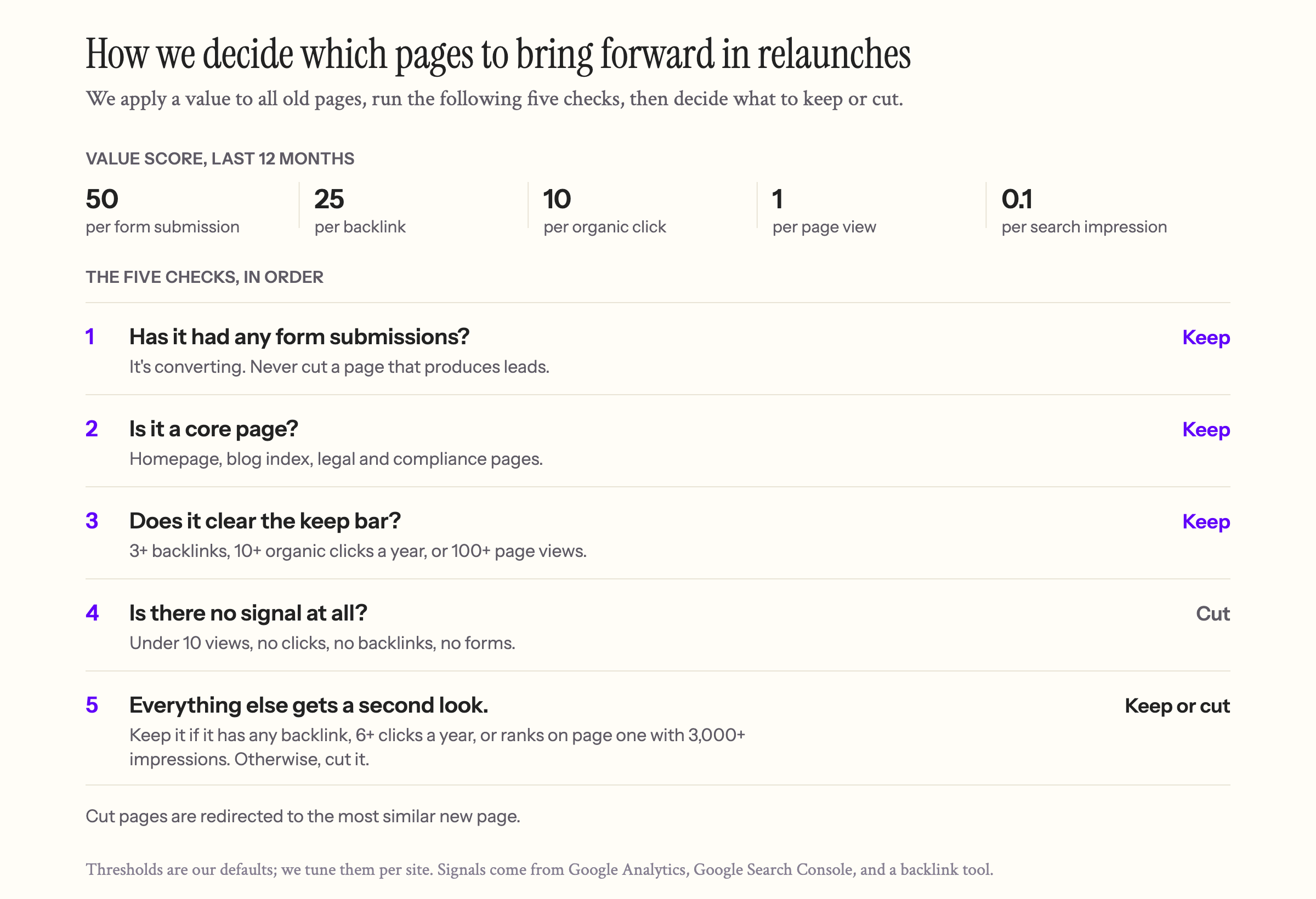
5. Finalize the cut list and build redirects
I'm surprised how often this step doesn't happen. You get excited about trimming the site and making it clean, and then you skip the redirects.
The easiest, most impactful thing you can do in migrations is prevent 404 errors. You lose the search value they earned, and links from other sites start pointing at nothing. This erodes a lot of your SEO over time so it's a problem you don't see immediate impact.
There's an art to redirects, too. Sending every old page to your homepage is a mistake; Google treats an unrelated redirect like a missing page. Redirect each old page to the most closely related new one. Better yet, keep the same URL whenever reasonable.
I spend some time reading the old pages to find their best match in the new structure. For old blog posts with no good match, redirect to the blog's main page rather than your homepage.
6. Design template pages for migrated content
We treat site design a bit like a house: the main rooms get the most attention, like the primary bedroom, the bathrooms, and the kitchen.
Most sites also have dozens of pages that can follow the same template. Some sales-heavy clients have dozens of industry pages, so we build one industry template that's easy to update. For other clients, it's blog posts, careers pages, or team bios.
This is where it pays to budget your time. You don't want to mail in these pages, but they don't need the design effort of your core pages. We design the templates, and then, frankly, I point Claude at the templates and the old content and have it migrate the pages.
The stricter your design system, the better Claude does. If it's loose, expect more cleanup, but this step can make a lot of pages look good with very little effort.
7. Set up SEO and AEO
This section will keep changing, because the practices keep changing, so here's what we do right now. I also want to dispel a myth: AEO isn't nearly as settled as people claim.
Standards take a long time to catch up. Much of what you hear about AEO best practices is still guesswork, partly because crawlers take time to index the web and the rules are still forming. That said, here's what we do:
- Clear page titles and meta descriptions across the entire site
- JSON-LD schema on each page
- OG images, with proper alt text, for every page
- A robots.txt file (usually generated automatically) and an llms.txt file
8. Tell Google about the new site
I ignored this step until recently. Once the site is live, submit your new sitemap in Google Search Console, then use URL Inspection to request indexing for your most important pages. That tells Google, "Hey, we have new pages here."
Save this for the very end, after the messaging is final and all the new pages are live. Think of it as an open house for Google: come crawl the new site.
If you skip it, you'll be okay; it just takes longer. But this step does the most to bridge your old site and your new one and limit the performance hit.
9. What happens after launch
I've launched or relaunched about 15 sites in the past year, and something is always wrong at this point. I used to expect bugs. In reality, the site usually works fine and every link clicks. The problems are small things, like:
- The right Google tag is missing from one of the pages.
- Analytics never got added.
- A few pages 404.
- Your huge list of redirects has a gap in it.
So the first thing to expect after launch is plugging holes. They're just not the holes you expect.
The second thing to expect is unreliable traffic. We usually time relaunches with social or PR posts, depending on how big the launch is, so you'll almost always get a spike from social media. That's different from search traffic, which is what you're really after. It's good traffic in the long run, because you're letting the market know. But the spikes are exciting, they'll make you feel great, and they won't last.
The third thing to expect is a dip. If you did a good job cleaning up, you'll have less traffic. No site migration should end with more pages; it should end with fewer. Like moving to a new house, you get rid of things you don't need anymore, so traffic dips.
Watch your traffic to make sure the dip is the one you expected and that your content is structured correctly. Over time it builds back up as Google reindexes and learns your new site. But a dip can also mean you made a mistake. I once left out some blog posts that were driving search traffic, and adding them back made a difference within a couple of weeks. It was an easy fix. Watching closely is how you catch it.

Your relaunch checklist
- Export every page, post, and media file.
- Audit each page against the new positioning, then against backlinks and a year of traffic.
- Keep pages sales or support still use, even with no traffic.
- Merge thin pages; split pages that cover too much.
- Redirect every cut or moved page to its closest match, never to the homepage by default.
- Build templates for repeatable pages and migrate into them.
- Add titles, descriptions, schema, OG images, robots.txt, and llms.txt.
- Submit the new sitemap and request indexing for key pages.
- After launch, check tags, analytics, 404s, and redirect gaps, then watch search traffic for a few months before judging the trend.
Re-platforming gives you a chance to clean up problems that have plagued a site for years. People often credit the new platform, or vibe coding, for better performance, but usually it's the cleanup that did it. AI tools and a clear process make the transition much easier. I hope this shows how the small things can have outsized effects, good or bad, when you relaunch a site.